
Introduction
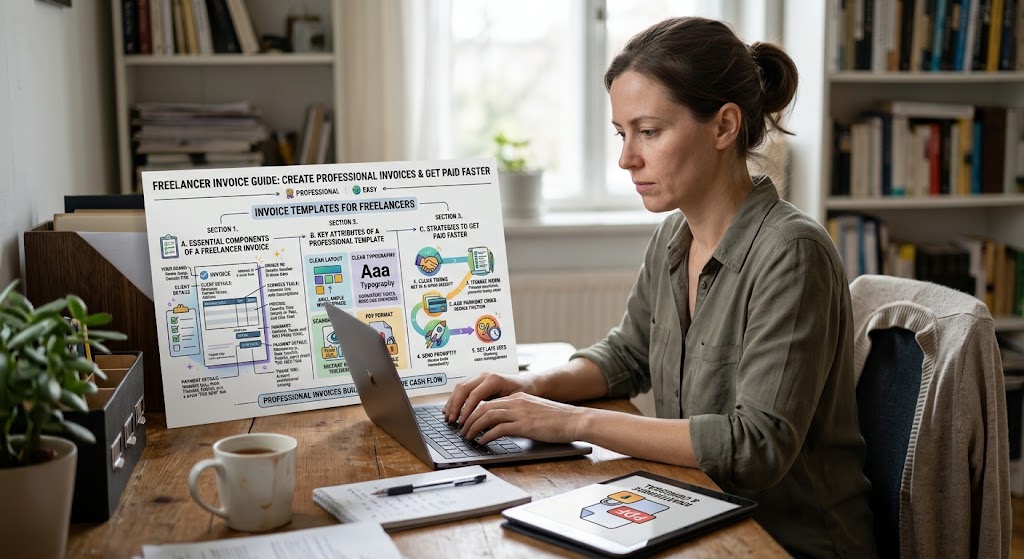
Managing payments is an important part of running a successful freelance business. Whether you work as a graphic designer, content writer, web developer, virtual assistant, or digital marketing consultant, sending clear invoices helps you maintain professional relationships with your clients. This is where invoice templates for freelancers become useful. Instead of creating a new invoice from scratch every time, you can use a ready-made format that saves time and keeps your billing organized.
The right invoice templates for freelancers can help you present your services, explain your charges, include payment instructions, and record important transaction details. A professional invoice also makes it easier for clients to understand what they are paying for and when payment is due.
Many independent professionals start with simple documents or spreadsheets. As their businesses grow, however, keeping track of different projects, payment dates, and outstanding balances can become challenging. Using invoice templates for freelancers provides a practical way to organize these tasks without investing in complicated accounting software.
In this guide, you will learn what freelance invoices should include, how to choose a suitable template, which invoice formats work best for different services, and how to improve your payment process.
What Are Invoice Templates for Freelancers?
Invoice templates for freelancers are pre-designed documents that independent professionals use to request payment for completed work, delivered services, or agreed project milestones.
These templates usually contain spaces for business information, client details, invoice numbers, service descriptions, prices, payment terms, and the total amount due. You simply replace the sample information with your own details before sending the invoice to your client.
Templates are available in several formats, including Microsoft Word, Excel, Google Docs, Google Sheets, and downloadable PDF documents. Some invoicing platforms also allow freelancers to customize and send invoices directly from their accounts.
For example, a freelance writer who charges $150 for a blog article can use a template to describe the assignment, mention the agreed rate, specify the due date, and provide payment instructions.
The same approach works for designers, developers, consultants, and other service providers. The important thing is to choose a format that suits your work and makes the payment process clear for your clients.
Why Freelancers Need Professional Invoices
Freelancing offers flexibility, but it also requires managing the administrative side of a business. Professional invoicing helps make that responsibility easier.
Keep Your Business Organized
A consistent invoice format allows you to record the services you provide and the payments you expect to receive. When you work with multiple clients, this information helps you identify unpaid invoices and review your earnings.
You can also use invoice numbers to find specific transactions without searching through every email conversation.
Build Trust With Clients
Clients generally expect clear documentation for the work they purchase. An invoice that includes your business details, a description of the services, and the agreed price demonstrates that you take your work seriously.
Professional presentation is particularly useful when working with agencies, established companies, and international clients.
Reduce Billing Mistakes
Creating invoices manually can lead to missing information, incorrect totals, or inconsistent payment instructions. A well-designed template reduces these problems by providing dedicated fields for essential details.
Spreadsheet templates can also calculate subtotals and totals automatically when their formulas are configured correctly.
Save Time on Repeated Tasks
Freelancers often provide similar services to different clients. Instead of rebuilding an invoice for every project, you can save a master template and update the relevant information.
This makes recurring billing faster and allows you to spend more time on client work.
What Should a Freelance Invoice Include?
A useful invoice should be easy to understand and contain enough information for the client to process payment.
Your Business and Contact Information
Include your name or business name, email address, and any other relevant contact details. If you operate through a registered business, you may also need to include its registered address or tax identification information, depending on local requirements.
Client Information
Add the client’s name or company name and the appropriate billing contact details. For larger organizations, confirm whether the invoice needs to include a purchase order number or a specific department.
Invoice Number and Dates
Every invoice should have a unique identification number. You should also include the date the invoice was issued and the payment due date.
For example:
- Invoice number: INV-2026-014
- Issue date: October 28, 2026
- Due date: November 11, 2026
These dates are illustrative. Choose payment deadlines that match your agreement with the client.
Description of Services
Explain what you completed or what the client is being charged for. Avoid vague descriptions such as “online work” or “professional services” when a more specific explanation is possible.
A content writer might list a blog article, editing services, and keyword research separately. A web developer could describe website maintenance, development hours, or a particular project milestone.
Rates, Quantities, and Total Amount
Show the agreed price for each service, its quantity where relevant, and the total amount payable.
For hourly projects, include the number of hours and the hourly rate. For fixed-price projects, list the agreed project fee.
If applicable, show taxes, approved expenses, discounts, and the final amount due separately.
Payment Methods and Terms
Tell clients how they can pay. Depending on your arrangement, this might include a bank transfer, an approved payment platform, or another agreed method.
Your terms should also state when payment is expected. Common arrangements include payment upon receipt, payment within 7 days, or payment within 14 or 30 days.
Only include late-payment fees when they are agreed upon and permitted by applicable law.
Best Invoice Template Formats for Freelancers
Different formats suit different working styles. The best option is the one that makes your billing process straightforward.
Microsoft Word Invoice Templates
Word templates are useful for freelancers who prefer a clean document with a simple layout. They allow you to edit text, change headings, add a logo, and customize the appearance of an invoice.
They are particularly suitable for fixed-price services such as writing, consulting, design, and project-based work.
However, Word documents may require manual calculations, so review all totals before sending them.
Excel Invoice Templates
Excel is a practical choice for freelancers who want automatic calculations and basic payment tracking.
You can create columns for descriptions, quantities, rates, and totals. With correctly configured formulas, the spreadsheet can calculate line items and the final amount automatically.
Excel is especially useful when you charge by the hour or bill clients for multiple services within one project.
Google Docs and Google Sheets
Google Docs and Google Sheets provide browser-based options for preparing invoices.
They can be convenient when you need to access your files from different devices or collaborate with a team. You can prepare an invoice, review the details, and export the finished document as a PDF.
Check your sharing permissions before sending a document containing business or client information.
PDF Invoice Templates
PDF invoices are useful when you want to send a consistent, professional document that is less likely to change when opened on another device.
You can create an invoice in a document editor or spreadsheet and export it as a PDF before emailing it to your client.
Keep an editable master copy so that you can update the template when your rates, business details, or payment terms change.
Online Invoice Generators
Online invoicing tools can be helpful when you regularly create invoices for multiple clients. Depending on the service, they may provide saved client information, automatic numbering, payment reminders, recurring invoices, and payment integrations.
Some services offer free plans, while others charge for advanced features. Review their pricing, data-handling policies, and payment options before choosing one.
How to Create an Invoice Using a Template
Creating an invoice does not need to be complicated. Following a consistent process helps you avoid unnecessary revisions.
Step 1: Choose a Suitable Template
Select a format based on your services and billing method. A simple Word or PDF template may be sufficient for fixed-price projects, while a spreadsheet can be more useful for hourly work.
Start with the essential information rather than adding decorative elements that make the invoice difficult to read.
Step 2: Add Your Business Details
Enter your name or business name, contact information, and any required registration or tax details.
Save these details in your master template so that you do not need to re-enter them every time.
Step 3: Enter the Client’s Information
Check the client’s legal or billing name and the correct contact details. If the client has specific invoicing requirements, follow those instructions before submitting your invoice.
This is particularly important when working with agencies or companies that use accounting departments to approve payments.
Step 4: Describe the Work Clearly
List the services covered by the invoice. Include relevant project names, delivery dates, quantities, or hourly rates where appropriate.
Make sure the description reflects the work you actually completed or the milestone covered by the invoice.
Step 5: Calculate the Amount Due
Review each line item and confirm that the calculations are correct. Add applicable taxes or approved expenses, and subtract any agreed discounts or payments already received.
The final amount should match your contract, proposal, or written agreement with the client.
Step 6: Add Payment Terms
Include the due date and your agreed payment method. If you accept more than one method, explain the available options clearly.
For international clients, confirm the invoicing currency and clarify who is responsible for any transfer or processing fees.
Step 7: Review and Send the Invoice
Before sending the invoice, verify the client name, invoice number, dates, descriptions, totals, and payment instructions.
Export the document as a PDF if appropriate, use a clear filename, and send it to the agreed billing contact. Keep a copy for your records.
Free Invoice Template Example for Freelancers
The following example shows how a simple freelance invoice can be structured. Replace the sample information with your own details.
FREELANCE INVOICE
From: Alex Morgan Creative Services
Email: alex@example.com
Bill To: BrightPath Media
Invoice Number: INV-2026-014
Invoice Date: October 28, 2026
Payment Due: November 11, 2026
| Description | Quantity | Rate | Amount |
|---|---|---|---|
| Blog article writing | 2 | $75 | $150 |
| Content editing | 1 | $30 | $30 |
| Subtotal | $180 | ||
| Tax | $0 | ||
| Total Due | $180 |
Payment Terms: Payment due within 14 days.
Payment Method: Use the payment method agreed upon with the client.
Notes: Thank you for your business. Please include the invoice number with your payment reference.
This is an illustrative example, not a universal tax-compliant invoice. Depending on your jurisdiction and business structure, you may need additional information, including tax registration numbers or specific disclosures.
Tips for Getting Paid Faster as a Freelancer
A good invoice makes payment easier, but your overall billing process matters too.
Agree on Payment Terms Before Starting
Discuss your rates, payment schedule, deposit requirements, and project milestones before beginning the work. Put the agreement in writing so that both parties understand their responsibilities.
For larger projects, milestone-based payments can help manage cash flow and reduce the amount of unpaid work you carry at one time.
Send Invoices Promptly
Do not unnecessarily delay invoicing after completing the agreed work. If your contract allows immediate billing upon delivery, prepare and send the invoice while the project details are still fresh.
For recurring services, establish a regular billing schedule.
Use Clear Subject Lines
When sending invoices by email, use a subject line that makes the purpose obvious. For example, “Invoice INV-2026-014 – October Content Services” tells the client what the email contains.
A clear subject line also makes the message easier to locate later.
Follow Up Politely
If a payment becomes overdue, send a short and professional reminder. Include the invoice number, original due date, outstanding amount, and payment instructions.
Sometimes delays happen because an invoice was missed or sent to the wrong contact. A polite reminder can resolve the issue without damaging the client relationship.
Track Outstanding Payments
Maintain a simple record of invoices issued, payments received, and balances remaining.
You can use a spreadsheet with columns for the invoice number, client, amount, issue date, due date, and payment status. Update it whenever you receive a payment or send a reminder.
Common Invoice Mistakes Freelancers Should Avoid
Even a well-designed template can cause problems if the information is incorrect.
Using duplicate invoice numbers: Give each invoice a unique number to simplify recordkeeping and communication.
Leaving out the payment deadline: Clients may not know when payment is expected if the invoice does not specify a due date.
Providing vague service descriptions: Clear descriptions reduce confusion about the work being billed.
Forgetting to update client details: Reusing an old invoice without replacing the previous client’s information can lead to administrative and privacy problems.
Ignoring tax requirements: Tax obligations vary by country and business type. Confirm the rules that apply to your business rather than assuming that every invoice can use the same format.
Failing to record payments: An invoice should be marked as paid, partially paid, or outstanding as appropriate. This prevents confusion when reviewing your finances.
Relying on one copy: Keep an organized record of issued invoices and payment confirmations in a secure location.
Frequently Asked Questions
Are invoice templates for freelancers free?
Many invoice templates are available at no cost through document editors, spreadsheet applications, and template websites. Some invoicing services offer free versions with limited features, while advanced functions may require a paid subscription.
Always check the terms of use before using a template for commercial purposes.
What is the best invoice format for freelancers?
The best format depends on your needs. Word or PDF works well for simple fixed-price projects, while Excel or Google Sheets can be useful for hourly billing and automatic calculations. Online invoicing software may be preferable if you need recurring invoices, client records, or automated reminders.
Can I create freelance invoices without accounting software?
Yes. You can create invoices using a document editor or spreadsheet, provided you include the required information and maintain accurate records. More advanced software may become useful as your client base grows.
How long should freelancers give clients to pay?
The payment deadline should be agreed upon before the work begins. Some freelancers request payment upon receipt, while others offer 7-, 14-, or 30-day terms. Choose a reasonable arrangement that suits the project, the client, and your cash-flow needs.
Should freelancers send invoices as PDFs?
PDF is often a practical choice because it preserves the document’s layout across devices. Keep an editable copy of the original template so you can correct mistakes and create future invoices efficiently.
Do freelancers need to charge sales tax or VAT?
That depends on your location, registration status, service type, and the client’s location. Some freelancers must collect applicable taxes, while others may not. Check the relevant tax authority’s guidance or consult a qualified tax professional when necessary.
Conclusion
Professional invoicing is an essential part of running a sustainable freelance business. The right invoice template can help you organize your billing, communicate your rates clearly, reduce administrative mistakes, and make it easier for clients to pay on time.
Start with a simple format that includes your business details, client information, invoice number, service descriptions, total amount, due date, and payment instructions. Choose Word, Excel, Google Docs, Google Sheets, PDF, or an online invoicing tool according to your needs.
Most importantly, use a consistent process. Send invoices promptly, track outstanding balances, and keep secure records of your transactions. With these habits in place, freelancers can spend less time managing paperwork and more time delivering quality work to their clients.