
Introduction: Why Searching Business Entities in North Carolina Matters
North Carolina adds thousands of new business registrations every single year. In fact, the state regularly ranks among the top ten in the country for new business formation. With that many businesses being created, knowing how to search for and verify business information is a skill that saves you time, money, and serious headaches down the road.
Whether you are starting a new business, checking if a company name is already taken, researching a vendor, or doing due diligence before signing a contract, the North Carolina business entity search tool gives you the information you need in minutes. It is free, it is public, and it is one of the most useful resources the state offers to business owners and consumers alike.
This guide walks you through everything you need to know about the North Carolina business entity search. You will learn where to find the tool, how to use it correctly, what the results mean, and what to do with the information once you have it.
What Is a North Carolina Business Entity Search?
A North Carolina business entity search is a free online lookup tool managed by the North Carolina Secretary of State. It gives anyone access to the official public records of businesses that are registered to operate in the state of North Carolina.
When a business forms in North Carolina, whether it is an LLC, a corporation, a partnership, or another type of legal entity, it must register with the Secretary of State. That registration creates a public record. The business entity search tool lets you access those records at any time without needing to go to a government office or file a formal records request.
The information in these records is official and legally recognized. This makes the search tool valuable for many different situations. You can use it to verify that a business is legally registered, to check whether a business name is already in use, to find the registered agent for a company, or to review the filing history of any registered business in the state.
Who Should Use the NC Business Entity Search Tool?
This tool is useful for a wide range of people, not just lawyers or business owners. Anyone who needs reliable information about a North Carolina business can benefit from using it.
If you are starting a new business, you need to check that your chosen business name is not already registered by someone else. Using the search tool before you file your registration saves you from having your application rejected and from investing money in branding that you cannot legally use. This is one of the most common reasons individuals use the tool.
Business owners, investors, and vendors use the search to verify that a company they are dealing with is a legitimate, registered entity. Consumers use it to check whether a business they hired is properly registered before paying for services. Journalists, researchers, and legal professionals use it to find official company information for reporting, analysis, or litigation purposes. The tool is genuinely useful for anyone who needs verified business information quickly.
Where to Find the North Carolina Business Entity Search
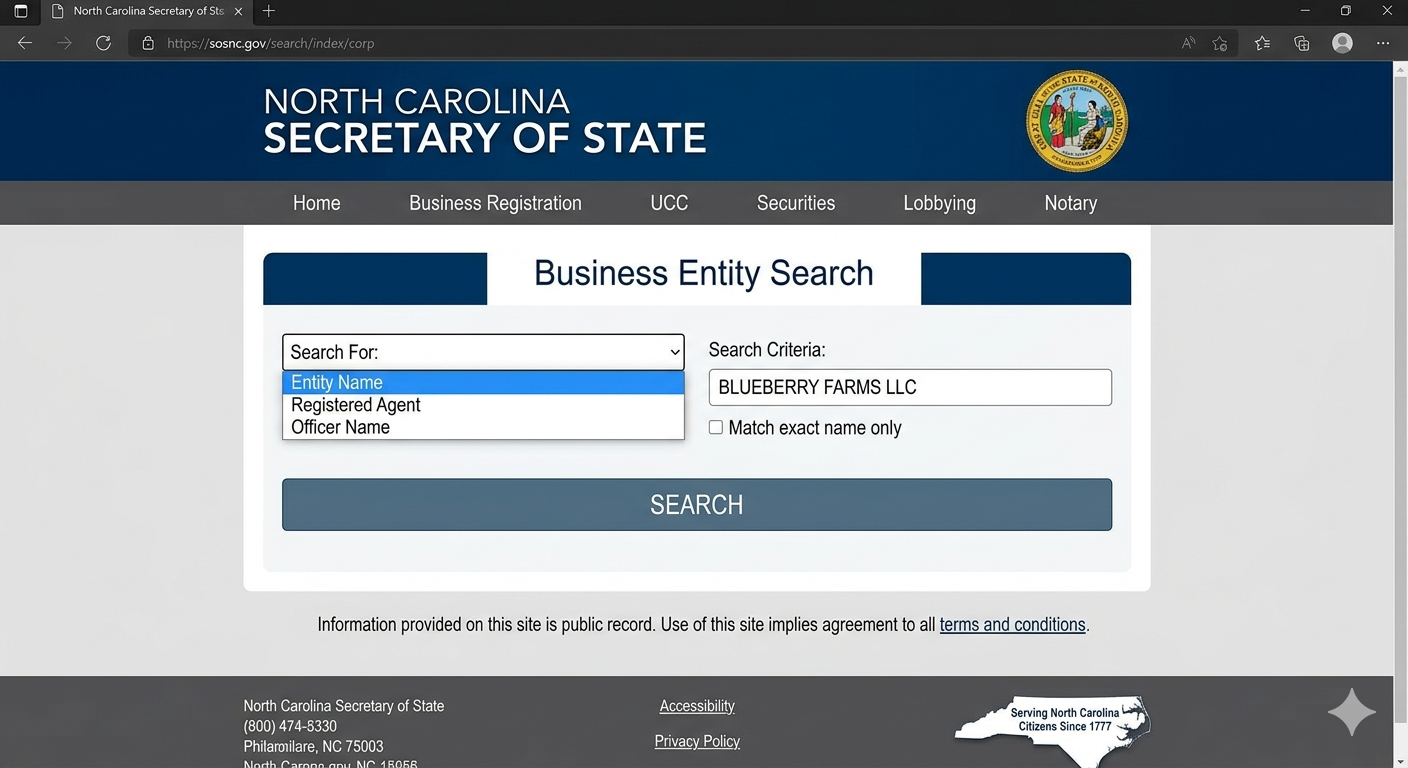
The North Carolina business entity search is located on the official website of the North Carolina Secretary of State. The direct web address is www.sosnc.gov. Once you are on the site, look for the business registration or business search section. The tool is listed clearly on the main navigation menu.
The official name of the search portal is the NC Secretary of State Business Registration Search. It is sometimes also referred to as the North Carolina Business Entity Search or the SOSNC Business Search. All of these names refer to the same tool in the same location on the Secretary of State’s website.
Always use the official state website to run your search. Third-party websites may offer similar lookups, but they pull data that can be outdated, incomplete, or inaccurate. The official SOSNC portal gives you the most current and legally reliable information available.
How to Do a North Carolina Business Entity Search Step by Step
Running a search is straightforward once you know what you are doing. Here is the process broken down into simple steps.
Step 1: Go to the official website. Open your browser and type www.sosnc.gov into the address bar. This takes you to the North Carolina Secretary of State’s homepage.
Step 2: Find the business search tool. Look for the “Business Registration” option in the main menu or on the homepage. Click it and then look for the search option within that section.
Step 3: Enter your search term. You can search by business name, registered agent name, or the business entity ID number if you have it. Type in the name of the business you are looking for and click the search button.
Step 4: Review the results. The tool will return a list of businesses that match your search term. Click on the specific business name you are interested in to see its full record.
Step 5: Read the full business record. The detail page shows you important information including the business name, entity type, status, formation date, registered agent, and filing history. Review each section carefully.
What Information Does the Search Results Page Show You?
When you click on a business in the search results, you get access to a detailed record. Knowing what each field means helps you get the most out of the information.
The business name field shows the official legal name of the entity as registered with the state. This is the name the business is legally required to use on contracts and official documents. The entity type tells you what kind of business it is. Common types include Limited Liability Company (LLC), Corporation, Limited Partnership, and Nonprofit Corporation.
The status field is one of the most important pieces of information on the page. A status of “Current” or “Active” means the business is in good standing with the state. A status of “Dissolved,” “Revoked,” or “Suspended” means the business is no longer legally active. The formation date tells you when the business was first registered. The registered agent section shows the name and address of the person or company designated to receive official legal notices on behalf of the business.
How to Search for a Business Name to Check Availability
One of the most common reasons people use this tool is to check whether a business name is available before registering. Here is how to do that correctly.
Type the business name you want to use into the search field. Start with the most important words in the name rather than the full name. For example, if you want to register “Blue Ridge Landscaping Services LLC,” search for “Blue Ridge Landscaping” first. This shows you all businesses with similar names, not just exact matches.
Review the results carefully. Look for any existing business with a name that is the same as or very similar to your chosen name. North Carolina does not allow two businesses to register names that are identical or deceptively similar. If you find a match, you will need to choose a different name before filing your registration.
Keep in mind that a name not appearing in the search results does not automatically mean it is available for registration. The Secretary of State’s office makes the final decision on name availability when you submit your filing. If you are unsure, you can contact the Business Registration Division directly for guidance before you file.
Understanding Business Entity Types in North Carolina
The search results show different types of business entities. Knowing the difference between them helps you understand what you are looking at when you review search results.
An LLC, or Limited Liability Company, is the most common business structure for small businesses in North Carolina. It offers personal liability protection to its owners, called members, while allowing flexible management and tax options. A Corporation is a more formal business structure that issues shares of stock and is governed by a board of directors. Corporations are common among larger businesses and those seeking outside investment.
A Limited Partnership has two types of partners: general partners who manage the business and have personal liability, and limited partners who invest but have limited involvement and limited liability. A Nonprofit Corporation is formed for charitable, educational, or social purposes rather than to earn profit for owners. Each entity type has different rules for formation, management, and taxation in North Carolina.
How to Search by Registered Agent Name
Sometimes you need to find all businesses associated with a particular registered agent rather than searching for a specific company name. The North Carolina business entity search tool supports this type of lookup as well.
On the search page, look for the option to search by registered agent. Enter the name of the registered agent you are researching. The results will show you all business entities in North Carolina that have listed that person or company as their registered agent. This is particularly useful for legal professionals and researchers who need to find all entities connected to a specific individual or firm.
A registered agent is the person or company that a business designates to receive official legal documents, government notices, and service of process. Every registered business in North Carolina is required by law to have a registered agent with a physical street address in the state. If a business’s registered agent information is outdated or incorrect, that is a red flag worth noting.
What Active and Inactive Status Means for a Business
The status of a business entity tells you a lot about its current standing with the state. Paying attention to status is important before doing business with any company.
An Active or Current status means the business has met all state requirements and is in good standing. This includes having filed all required annual reports and paid all associated fees. An active business is legally authorized to conduct business in North Carolina.
A Dissolved status means the business has been formally closed, either voluntarily by its owners or involuntarily by the state. A dissolved business no longer has legal authority to operate. A Revoked status typically means the state has revoked the business’s authority to operate, usually because it failed to file required annual reports or pay fees. If you are considering doing business with a company that shows a status of Dissolved or Revoked, proceed with extreme caution.
How to Find Annual Report Filing History for a Business
North Carolina requires most registered businesses to file an annual report with the Secretary of State each year. These reports update the state on the current status of the business, including any changes to officers, registered agents, or addresses.
The business entity search tool lets you view the filing history for any registered entity. On the business detail page, look for a section labeled “Filings” or “Document History.” This section lists every document the business has filed with the Secretary of State, including the original formation documents, annual reports, and any amendments.
Reviewing the filing history tells you whether a business has been keeping up with its legal obligations. A business that has missed several annual reports may be at risk of having its registration revoked. This kind of information is particularly useful when you are considering entering into a contract or business relationship with a company and want to assess its reliability and compliance record.
Common Mistakes People Make When Using the Search Tool
Even though the search tool is straightforward, a few common mistakes can lead to incomplete or confusing results. Knowing these pitfalls ahead of time saves you frustration.
The most common mistake is searching for an exact business name when a partial name search would return better results. For example, if you search for “Carolina Blue Roofing LLC” and the business is registered as “Carolina Blue Roofing Company LLC,” you might miss it with an exact search. Always try a partial name search using the most distinctive words to cast a wider net.
Another common mistake is relying on the search results to confirm name availability before filing. As mentioned earlier, the state office makes the final call on name conflicts. A name not appearing in the search does not guarantee approval. A third mistake is using third-party business search websites instead of the official SOSNC portal. Third-party data is often delayed or incomplete, which can lead to incorrect conclusions about a business’s status or information.
How to Use This Search for Due Diligence Before Signing a Contract
Due diligence means doing your homework before making an important business decision. The North Carolina business entity search is one of the best free tools available for basic business due diligence.
Before signing a contract with any company, search for their registered business name in the database. Confirm that the company is active and in good standing. Check that the business name on the contract matches the exact legal name in the state records. Look at the registered agent information to make sure it is current and legitimate. Review the filing history to see whether annual reports have been filed consistently.
If any of these checks raise a concern, ask questions before signing. A business that is not in good standing with the state may have difficulty fulfilling its legal obligations. Taking five minutes to run a search before a major business decision is one of the simplest ways to protect yourself from potential problems.
Searching for Foreign Entities Registered in North Carolina
Not every business in the state records is originally from North Carolina. Businesses formed in other states can register in North Carolina as a “foreign entity” if they want to conduct business in the state. The search tool covers these foreign registrations as well.
A foreign LLC or corporation is one that was formed under the laws of another state but has registered with North Carolina to operate here legally. In the search results, these entities are typically identified by their entity type, which will say something like “Foreign Limited Liability Company” or “Foreign Business Corporation.”
Knowing whether a business is a domestic or foreign entity can be useful in certain situations. For example, if a business dispute arises, knowing where a company was originally formed determines which state’s laws apply to certain aspects of the legal situation. For most everyday purposes, however, the key information is simply whether the entity is active and in good standing in North Carolina.
How the NC Business Entity Search Helps Entrepreneurs Avoid Legal Problems
Starting a business with a name that is already registered by someone else creates serious legal problems. You could face a lawsuit for trademark infringement or be forced to rebrand after you have already spent money on marketing materials, a website, and signage. The business entity search tool helps you avoid this situation entirely.
Run a search before you invest any money in your new business name. If the name is taken, you find out before filing and can adjust your plans. If the name appears available, you can move forward with more confidence. Some entrepreneurs also search for similar business names in nearby states and check federal trademark databases for an even more thorough check before committing to a name.
The search tool also helps existing business owners keep an eye on their own business records. Mistakes happen in government databases. Logging in periodically to verify that your business information is accurate and that your status is current protects you from surprises that could affect your ability to operate legally.
What to Do If You Find Errors in a Business Record
If you run a search and find that your own business record contains incorrect information, you can take steps to fix it. The North Carolina Secretary of State’s office has a process for correcting errors and updating records.
Minor changes like updating a registered agent or principal office address can be made by filing an amendment with the Secretary of State. More significant changes, such as changing the business name, require a formal amendment to the original formation documents. The SOSNC website has forms available for each type of change, and most can be filed online.
If you find errors in another business’s record, you generally cannot change those records yourself. However, if the error creates a conflict with your own business name, you can contact the Secretary of State’s office to report the issue and ask for guidance on how to resolve it.
North Carolina Business Entity Search vs. Other State Search Tools
Every state in the US has its own business registration database and search tool. North Carolina’s system is well-regarded for being relatively user-friendly and up to date. However, understanding how it compares to other states helps if you are researching businesses that operate across multiple states.
| Feature | NC SOSNC Search | Typical State Average |
|---|---|---|
| Free to access | Yes | Yes in most states |
| Real-time data updates | Yes | Varies by state |
| Search by registered agent | Yes | Not always available |
| Online filing history access | Yes | Sometimes limited |
| Mobile-friendly interface | Improving | Varies widely |
North Carolina updates its database regularly, which means the information you see is generally current. Some states have significant delays between when a filing is submitted and when it appears in the public database. This makes the NC system more reliable for time-sensitive searches than databases in states with longer processing delays.
How to Contact the NC Secretary of State’s Office for Help
If you run into a problem with a search or have questions about a specific business record, the North Carolina Secretary of State’s office has resources to help you.
The Business Registration Division can be reached by phone, email, or in person at their office in Raleigh. The SOSNC website lists current contact information, hours of operation, and instructions for submitting written inquiries. For most straightforward questions, the phone line is the fastest way to get a direct answer from a staff member who knows the system well.
The website also has a comprehensive FAQ section that covers many common questions about how to search, how to file, and how to correct records. If your question is not answered there, submitting an email inquiry is a good second option. Response times are typically within a few business days for routine inquiries.
Additional Resources Connected to the NC Business Entity Search
The North Carolina Secretary of State’s website offers more than just the business entity search. Several related tools and resources are available on the same platform that can be useful for business owners and researchers.
The UCC Search tool lets you search for Uniform Commercial Code filings, which are records of secured transactions related to business loans and financing. The Notary Search tool lets you verify whether a notary public is properly commissioned in North Carolina. The Charities Search tool gives you access to records for registered nonprofit organizations.
For business owners, the website also provides access to online filing tools that let you file annual reports, make amendments, and submit new business formation documents entirely online. This integrated approach means you can manage most of your business’s state compliance needs in one place, without needing to mail paper forms or visit a government office in person.
Conclusion: Use the NC Business Entity Search to Protect Yourself and Your Business
The North Carolina business entity search is one of the most practical free tools available to anyone starting, operating, or researching a business in the state. It takes only a few minutes to use, and the information it provides can prevent expensive mistakes, verify business legitimacy, and give you confidence before making important decisions.
Whether you are checking a business name before you register, researching a vendor before you sign a contract, or simply verifying that your own business record is accurate and current, this tool gives you direct access to official state records without any cost or complexity. There is no good reason to skip this step when the information is available instantly and for free.
Go to www.sosnc.gov today and run your first search. If you are starting a business, check your chosen name right now before you invest another dollar in your brand. If you are researching another company, take five minutes to verify their status and filing history. It is a simple action that can save you from significant problems down the road.